
On June 17, 2025, VMware Cloud Foundation 9 was officially released. Since then, many details about the updates have been shared. If you want to stay current with all the announcements, it’s worth following the official VMware blog.
Last week I published part 1 of this series, where I talked about the changes in the ESXi kernel.
Today, I’ll talk about the main changes and improvements in the VCF 9 architecture.
VCF Installer
Anyone who deployed VCF 5.2 (or earlier versions) knows that the installation process was not simple. You had to download a script, edit JSON configuration files, and then start the install — and if something was wrong, the troubleshooting process was complex, and in the end you might have to start over.
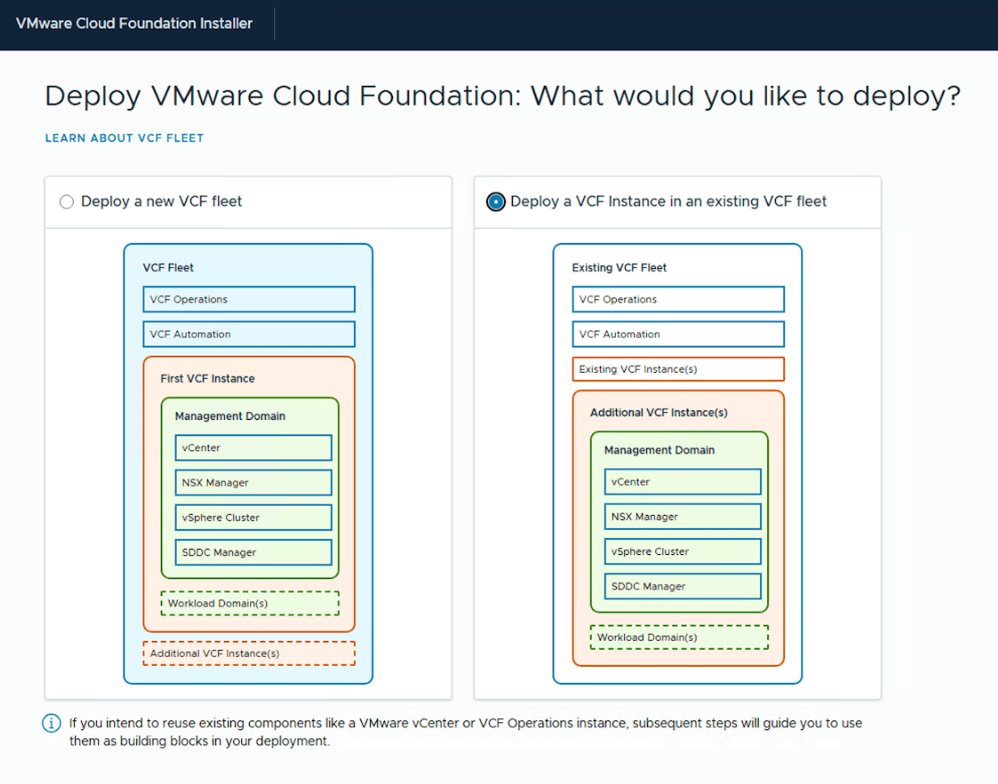
In VCF 9, this method has evolved. Now there’s the VCF Installer, which allows the installation of the entire VCF infrastructure from a single interface, for both greenfield and brownfield deployments.
VCF Fleet
One of the biggest new concepts in VCF 9 is the the VCF Fleet.
It’s a new concept that surges between the VCF Private Cloud and the VCF Instances. Each VCF Fleet includes one instance of VCF Operations and one instance of VCF Automation.
This is a major difference from version 5.2, where each VCF instance could contain its own separate Aria Suite components.

Na versão 9, o nome Aria Suite ficou para trás e foram adotados novos nomes: VCF Operations e VCF Automation.
Also, in VCF 9, the old “Aria Suite” name has been replaced by VCF Operations and VCF Automation. Independent of how many VCF instances exist, a fleet only has one VCF Operations and one VCF Automation instance.

VCF Operations
VCF Operations is now responsible for managing the entire VCF Fleet infrastructure.
With its Fleet Management capabilities, you can centrally manage the following components:
- Licenses
- Lifecycle (updates/upgrades)
- Identity and Access
- Certificates
- Passwords
- Tags
- Configurations

VCF Identity Broker
Another change is the replacement of Workspace ONE Access (formerly Identity Manager) with VCF Identity Broker.
This new component allows configuring SSO (Single Sign-On) more quickly and more integrated across all products within the VCF Fleet.
VCF Identity Broker can be installed in two ways:
- Embedded — The service is installed directly in the vCenter;
- Appliance — External installation with a 3-node cluster for high availability.

This is the VCF Identity Broker architecture for a 3 node cluster:

Conclusion
Overall, it’s now simpler to plan, deploy, and manage VMware Cloud Foundation. The introduction of the VCF Installer, VCF Fleet, VCF Operations, and VCF Identity Broker represents a significant improvement in the operational model.
 lanznot.com
Leave a comment